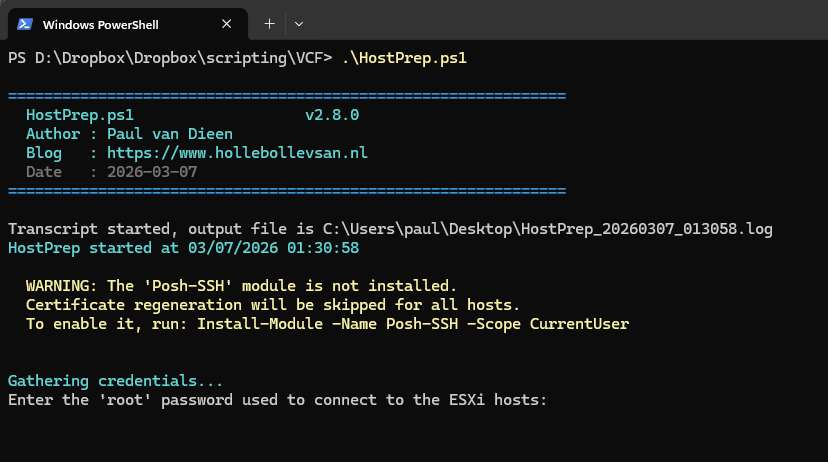

Update — July 2026 (HostPrep.ps1 v4.1.1): the SSH plumbing has changed twice since I first published this. v4.1.0 dropped the Posh-SSH module in favour of the built-in Windows OpenSSH client, and v4.1.1 switched the actual authentication to the root password over that same client, because ESXi 9 removed the HTTPS endpoint the old key install depended on. The net result: HostPrep now has no external module dependencies at all. The new SSH Authentication section below covers the ESXi 9 change and how the new authentication works.
Overview
When commissioning ESXi hosts into SDDC Manager as part of a VMware Cloud Foundation 9 deployment, there are a handful of preparation steps that need to be done on every host before it can be added to the inventory. Doing this manually across a dozen or more hosts is tedious and error-prone, so I wrote a pair of PowerShell scripts to handle it automatically — one to prepare the hosts, and one to commission them into SDDC Manager via the REST API.
- HostPrep.ps1 (v4.1.1) — prepares ESXi hosts with DNS validation, NTP configuration, certificate management, vSAN disk wipe, and optional password resets
- Commission-VCFHosts.ps1 (v3.1.4) — commissions prepared hosts into SDDC Manager via REST API with validation reporting
HostPrep.ps1 Functionality
The script processes hosts sequentially through these steps:
- DNS validation — performs forward (A record) and reverse (PTR) lookups before connecting
- PowerCLI connection — establishes direct connection to each host using root credentials
- NTP configuration — verifies required servers are configured and ntpd is running
- Advanced settings — sets
Config.HostAgent.ssl.keyStore.allowSelfSignedto true (required by SDDC Manager) - Optional advanced settings — applies deployment-specific configurations
- Storage type detection — identifies primary storage as VMFS_FC, NFS, or vSAN
- 6b. vSAN disk wipe (optional,
-WipeDiskonly) — enumerates non-boot disks with existing partitions and wipes them viapartedUtilover SSH, preparing disks for clean vSAN commissioning - Certificate regeneration — reads the ESXi configured hostname and compares it to the FQDN before attempting regen; regenerates if CN mismatches, reboots, and re-validates after
- Password reset (optional) — changes root password to VCF 9-compliant value; always runs last
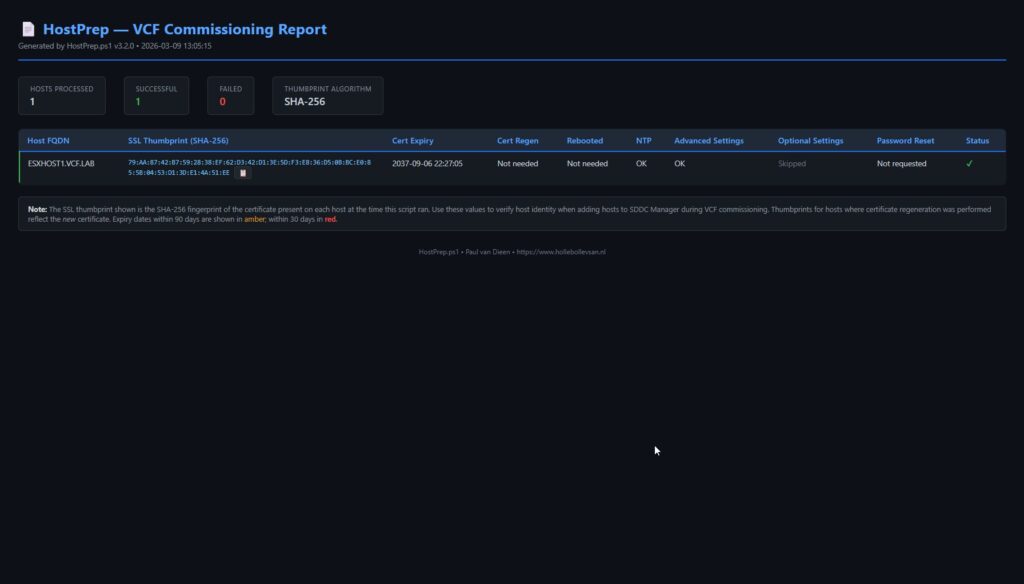
The script generates three outputs: a colorized console summary table, an HTML commissioning report, and a CSV file for Commission-VCFHosts.ps1.
vSAN Disk Wipe
When recommissioning ESXi hosts that were previously part of a vSAN cluster, the disks still carry existing partition tables from the old cluster. SDDC Manager will refuse to commission those hosts until the disks are clean. The -WipeDisk switch automates this step.
When specified, the script runs the following on each host after storage type detection:
- Enumerates all storage devices via
esxcli storage core device list - Unconditionally excludes the boot disk — identified by the
IsBootDriveflag; falls back to a ≤ 8 GB size heuristic if the flag is not set - Lists all non-boot disks with existing partition tables and prints them to the console
- Prompts Y/N per host before making any changes — you always see what will be wiped before confirming
- Unmounts any VMFS datastores on target disks
- Wipes partition tables via SSH:
partedUtil mklabel <device> gpt - Disables SSH again when done
Boot disk is always protected. It is excluded at enumeration time and never passed to
partedUtilregardless of the Y/N answer.
The disk wipe only runs for hosts detected as VSAN. It is skipped automatically for VMFS_FC and NFS hosts.
The wipe uses partedUtil over SSH via the built-in Windows OpenSSH client — no module required (see the SSH Authentication section below). If ssh.exe is unavailable, the script prints per-host manual instructions instead of failing.
A DiskWipe column is added to both the console summary table and the HTML commissioning report, showing the per-host result: OK, Skipped (non-VSAN or no disks to wipe), Skipped (DryRun), or Failed.
SSH Authentication (updated for v4.1.1)
Two steps in HostPrep need a shell on the host rather than an API call: certificate regeneration (/sbin/generate-certificates) and the optional -WipeDisk disk prep (partedUtil). Both go over SSH.
Earlier versions of the script leaned on the Posh-SSH module for this. HostPrep no longer needs it. SSH now runs entirely through the built-in Windows OpenSSH client (ssh.exe, standard on Windows 10 1809+ and Windows 11), authenticating with the root password through ssh’s own SSH_ASKPASS helper. There is nothing to install and nothing to pre-stage:
- No
Install-Module Posh-SSH. - No manual SSH key setup on the hosts.
- SSH is enabled on the host only for the duration of the operation and switched off again afterwards.
- The root password is never passed on the command line or left in the process list — it lives in a throwaway helper file for the length of the run and is deleted at the end.
If ssh.exe is somehow unavailable, the script degrades gracefully: it prints the exact generate-certificates / partedUtil commands to run by hand instead of failing the whole run.
Why the change: ESXi 9 removed the authorized_keys endpoint
v4.1.0 still installed a throwaway SSH key on the host first, by PUTting the public key to https://<host>/host/ssh_root_authorized_keys — a trick that worked fine on ESXi 7.x and 8.x. On ESXi 9 that PUT suddenly returned 404 Not Found.
Don’t let an unauthenticated probe fool you here: the entire /host/* namespace sits behind a single 401 guard, so any path under it answers 401 without credentials, whether it exists or not. Authenticated, the picture is unambiguous:
curl -sk -u root https://esxi01/host/ssh_root_authorized_keys -o /dev/null -w "%{http_code}n"   # 404  <-- gone
curl -sk -u root https://esxi01/host/ssl_cert                 -o /dev/null -w "%{http_code}n"   # 200  <-- still there
curl -sk -u root https://esxi01/host/ssl_key                  -o /dev/null -w "%{http_code}n"   # 405  <-- still there (PUT only)
Same credentials, same /host/ file service — only the ssh_root_authorized_keys endpoint is no longer registered on the ESXi 9 builds I tested. With no way to pre-install a key, v4.1.1 authenticates with the root password instead, and sidesteps the endpoint entirely.
How the password reaches ssh.exe
ssh.exe refuses a password on the command line by design. The supported mechanism is SSH_ASKPASS: point an environment variable at a small helper program that prints the password, and ssh runs it when it needs one. HostPrep writes the password to a temp file, generates a one-line askpass.cmd that types it (so cmd never parses the password and special characters survive), and cleans both up at the end of the run.
Three gotchas cost me time getting this to work against ESXi, so I’ll save you the trouble:
- ESXi’s sshd offers
keyboard-interactive, notpassword. ForcingPreferredAuthentications=passwordgets youPermission denied (publickey,keyboard-interactive)— the server never advertised thepasswordmethod. Usekeyboard-interactive. - ssh only calls
SSH_ASKPASSwhen there is no console — unless you setSSH_ASKPASS_REQUIRE=force(OpenSSH 8.4+; the client on Windows 10 1809+/11 is new enough). - Do not set
BatchMode=yes. It disables the very prompt that askpass is there to answer.
The full implementation is in HostPrep.ps1 on GitHub — see Get-HostPrepSSHAuth and Invoke-ESXiSSHCommand.
Storage Type Detection
The script automatically identifies storage types:
- VMFS_FC — presence of Fibre Channel HBA
- NFS — mounted NFS datastore
- vSAN — default for all other hosts
Important limitation: vSAN OSA versus ESA cannot be auto-detected on unclaimed disks. Users must manually edit the CSV if ESA or vVols deployment is intended.
CN Mismatch Detection
Before v3.7.0, the script would attempt certificate regeneration based solely on the CN in the TLS certificate presented on port 443. It would regenerate, reboot, and only discover after the host came back online that the CN was still wrong — because /sbin/generate-certificates uses the ESXi configured hostname, not the FQDN you provided.
The script now reads the ESXi configured hostname via Get-VMHostNetwork and compares it against the FQDN from the hosts file before attempting any regeneration. If they differ, regen is skipped immediately and the host is flagged as CN mismatch — saving the reboot entirely. After a successful regen and reboot, the CN is re-checked to confirm it now matches. A mismatch at either point marks the host as failed (red) in both the console summary and the HTML report.
This matters because SDDC Manager will not commission a host whose certificate CN does not match its FQDN. Catching this early surfaces the real problem — the ESXi hostname needs fixing — rather than looping through a pointless regeneration cycle.
Key Features
- DNS validation with mismatch flagging
- Fully interactive operation requiring no pre-configuration
- VCF 9 password validation before host modification
- CN mismatch detection before and after certificate regeneration
- vSAN disk wipe with boot disk protection and Y/N prompt per host
- Automated certificate regeneration and disk wipe over the built-in Windows OpenSSH client — no external modules required
- Configurable advanced settings without logic modification
- Dry run and report-only modes via
-DryRunand-WhatIfReportswitches - Reboot timeout handling with warnings
- Dark-mode HTML report with copy-to-clipboard certificate thumbprints
- CSV output ready for next-phase commissioning
HTML Commissioning Report
The report displays SSL thumbprints in SHA256:<base64> format with one-click copy buttons, certificate expiry highlighted (amber within 90 days, red within 30), DNS status, disk wipe result, and per-step status indicators for each host.
Commission-VCFHosts.ps1 Workflow
The commissioning script performs these operations:
- Reads the CSV from HostPrep.ps1
- Prompts for SDDC Manager credentials and detects version via API
- Retrieves available network pools for selection
- Displays storage types (no prompting; edit CSV if changes needed)
- Prompts for ESXi root password
- Saves sanitized JSON payload with masked passwords
- Validates all hosts via
POST /v1/hosts/validations - Commissions hosts via
POST /v1/hostsand polls for completion - Retrieves assigned SDDC Manager host UUIDs
- Generates HTML report and results CSV
Validation Report Structure
The validation report handles the nested VCF 9 API response structure by:
- Flattening per-host checks from the top-level wrapper
- Excluding wrapper validation from result counts
- Deriving per-host pass/fail status from error messages for accuracy
The report includes stat cards, per-host summary table, full validation checks with color coding, and debug files with sanitized payloads.
Output Files
Commission-VCFHosts.ps1 generates timestamped files:
Commission_<ts>_Payload.json— sanitized JSON (passwords masked)Commission_<ts>_ValidationResponse.json— raw SDDC Manager responseCommission_<ts>_ValidationReport.html— detailed validation reportCommission_<ts>_Report.html— commissioning report with host UUIDs (one-click copy per UUID)Commission_<ts>_Results.csv— per-host results including host UUIDs
Prerequisites
Before first use:
Set-PowerCLIConfiguration -Scope User -ParticipateInCEIP $false -Confirm:$falseThat’s it. Automated certificate regeneration and -WipeDisk use the built-in Windows OpenSSH client (ssh.exe, standard on Windows 10 1809+ and Windows 11) — nothing to install.
Usage Examples
Prepare hosts interactively:
.HostPrep.ps1Wipe vSAN disks during prep (prompts Y/N per host before wiping):
.HostPrep.ps1 -WipeDiskDry run — shows which disks would be wiped, no changes made:
.HostPrep.ps1 -WipeDisk -DryRunGenerate report without modifications:
.HostPrep.ps1 -WhatIfReportCommission hosts from CSV:
.Commission-VCFHosts.ps1Validate only without commissioning:
.Commission-VCFHosts.ps1 -ValidateOnlyPass arguments to skip prompts:
.Commission-VCFHosts.ps1 -CsvPath "C:VCFHostPrep_20260320_Commissioning.csv" -SddcManager sddc-manager.vcf.labDownload
Both scripts are available on GitHub: github.com/pauldiee/VCFHostPreparation
The original article was posted on: www.hollebollevsan.nl