So, you started a project with several Entity Framwork 4+ code first models. And you use data annotation attributes in combination with resource files to set your displaynames and error messages. Like so:
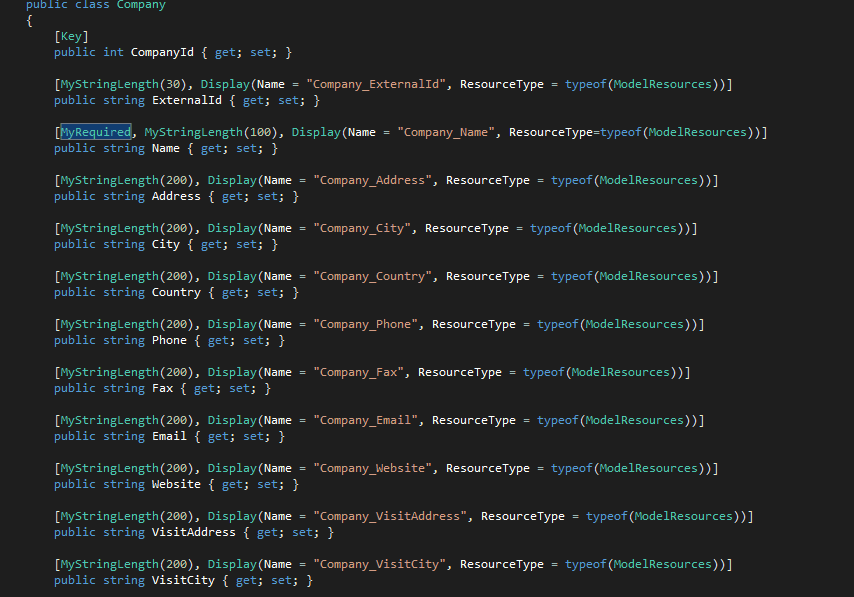
Now, if you want to fill the resource file initially, it would be nice to copy paste something into it.. but this does not work. And I have 20+ models each with 20+ properties.. errrhh.
Solution is this.. run this SQL script on the database that is generated by EF:
DECLARE @name nvarchar(128)
DECLARE @col nvarchar(128)

DECLARE cur CURSOR FOR
SELECT TABLE_NAME + '_' + COLUMN_NAME as name, COLUMN_NAME as col
FROM INFORMATION_SCHEMA.COLUMNS
OPEN cur

FETCH NEXT FROM cur INTO @name, @col;
WHILE @@FETCH_STATUS = 0
BEGIN
PRINT '<data name="'+ @name +'" xml_space="preserve">'
PRINT ' <value>' + @col + '</value>'
PRINT '</data>'
FETCH NEXT FROM cur INTO @name, @col;
END

CLOSE cur;
DEALLOCATE cur;
This will create an output like this:
<data name="Contacts_Country" xml_space="preserve">
<value>Country</value>
</data>
<data name="Contacts_PersonalInterests" xml_space="preserve">
<value>PersonalInterests</value>
</data>
<data name="Contacts_Memo" xml_space="preserve">
<value>Memo</value>
</data>
<data name="Contacts_ImportantNotes" xml_space="preserve">
<value>ImportantNotes</value>
</data>
<data name="Contacts_Extra" xml_space="preserve">
<value>Extra</value>
</data>
And you can copy paste this in the xml from the resource file, open the .resx file with an xml editor and copy paste.
And your done in 3 minutes.
Hope this helps